Design Challenge · Product Design · B2B SaaS
Pillar · Activity Management
Designing a clear, actionable workspace for the operational events construction teams deal with every day, from invoices and delivery notes to documents received through WhatsApp.
Independent design challenge based on Pillar's product context. Not affiliated with Pillar.
Role
Product Designer
Year
2026
Overview
Pillar is a digital platform for construction companies that centralizes operational and administrative workflows. As part of a design challenge, I designed a new activity management experience for events coming from different sources, including events generated by the system and documents received through WhatsApp. The goal was not to create another notification feed, but to help users understand what requires attention, why it matters and what action to take next.
Problem
Construction teams deal with a continuous stream of operational events: invoices, delivery notes, reports, banking issues and documents received from the field. These events differ in urgency, source, context and required action. Shown as a flat list, they would be hard to scan and even harder to prioritize. The challenge was to create a single, scalable view that could handle this complexity without overwhelming the user.
How might we turn a heterogeneous stream of events into a clear and actionable work queue?
Product approach
I approached the problem as an operational queue rather than a notification center: a workspace where every event quickly answers three questions. What happened? How important is it? What can I do about it? This led to a stable table structure, explicit prioritization, contextual actions and filters that let the same view scale as the number and variety of events grow.
Make priority understandable
Priorities are not only expressed as High, Medium or Low, but come with the reason behind them.
Make context scannable
Source, project context, amount and timing are separate pieces of information, so activities can be compared at a glance.
Keep actions contextual
Each activity exposes the most appropriate next action, such as opening, verifying or reconnecting.
Core structure
Active queue
Active events live in a single operational view, ordered by priority by default. Completed events are kept separate, so the main workspace stays focused on unresolved work.
Prioritization
Priority is separated from deadline. An event can matter because of its urgency, economic impact, operational criticality or the time it has been left unmanaged. Each priority is paired with a reason, which makes the recommendation easier to understand and to challenge.
Filtering & sorting
Filters narrow the queue by event type, priority, source, deadline and construction site. Alternative sorting options include nearest deadline, most recently received and highest amount.
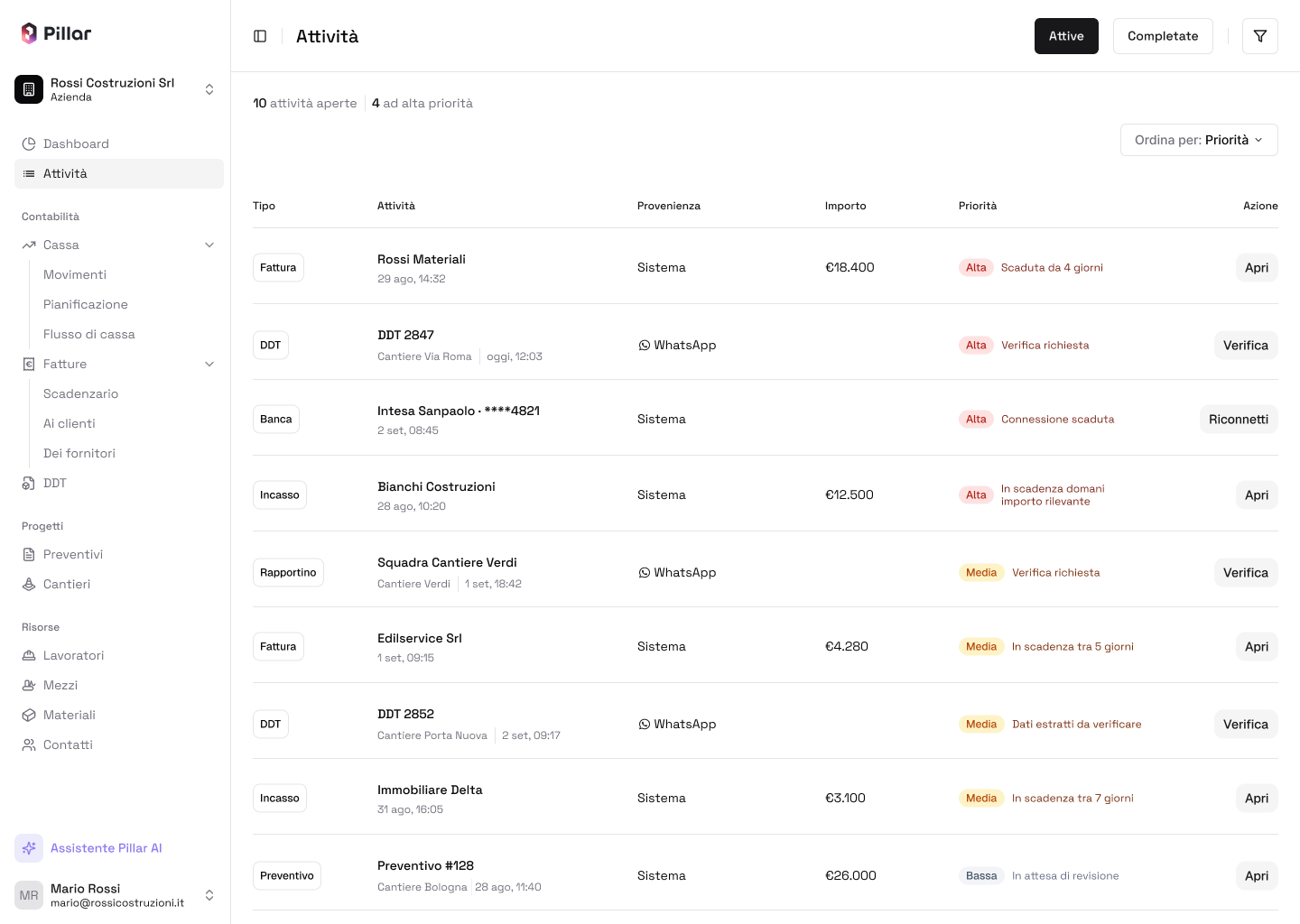
A prioritized operational queue
The default view puts unresolved work first instead of simply listing events in chronological order. Each row combines event type, operational context, source, financial impact, priority and a contextual action, so the queue can be scanned without opening individual records.
Active view · Default priority ordering
Key design decisions
Priority is explainable
A simple High, Medium or Low label would not give enough context. Each priority is paired with a reason, such as “Connection expired” or “Data extracted for verification”.
Source is explicit
System and WhatsApp are treated as distinct sources and shown directly in the table. The origin of an event is immediately scannable, and the model can grow to include future sources.
Contextual actions
Actions depend on the event instead of being forced into one generic workflow. A document may need verification, a bank connection may need reconnecting, while an invoice can simply be opened.
Filters instead of multiple views
I first considered a dedicated “Focus” view for high priority events, then moved away from it because it duplicated what filtering and sorting already provide. One active queue keeps the information architecture simple, while still letting users narrow the data when needed.
Filtering the queue
When the dataset becomes more complex, users can narrow the queue without leaving the main workflow. Applied filters stay visible above the table, so the current view is understandable and reversible at a glance.
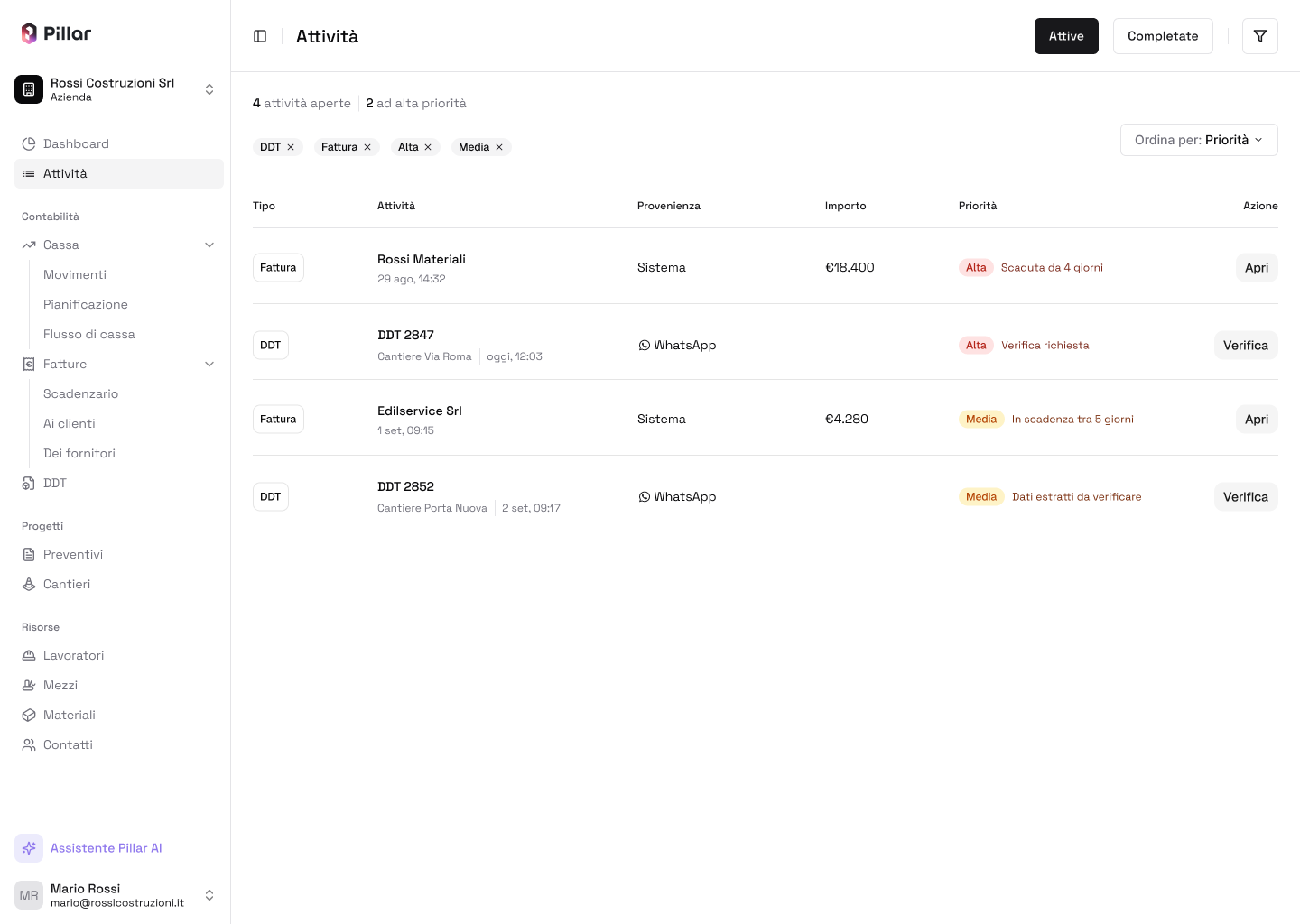
Active view · Multiple filters applied
Designed for growth
The interface is built on a stable information structure rather than a fixed set of events. New event types or sources can be added without new sections or navigation patterns. Filters and sorting progressively narrow a larger dataset, while the split between active and completed work keeps the main workspace focused. For much larger volumes, the same model can support pagination or progressive loading without changing how the interaction works.
Outcome
The result is a single operational workspace that turns heterogeneous events into a prioritized, actionable queue. Instead of adding more dashboard information, the design helps users see what needs attention, understand why and take the right next step.
Learnings
Designing operational tools takes more than organizing information. The interface has to communicate urgency, context and next actions without making users process every piece of data one by one. The main learning: reducing cognitive load does not mean hiding information. A strong hierarchy, explicit prioritization, contextual actions and controlled filtering can make a dense dataset manageable without removing useful context.